Silhouette Sunday #11: Silhouette Studio Software update 3.0.343 release

Hello Everyone!

Wow I almost missed Sunday! My boys are on vacation this week and my work schedule has been crazy so things are way off schedule. I was hoping to share some projects with you but they got pushed to the side to play with my boys.

I did want make sure I commented on the latest update to the Silhouette Software.  As you know from my previous post, I downloaded the update as soon as it was released. Many people were upset about many of the functionality that they come to rely on being removed from the first update.  For example the cut lines functionality was removed and you were forced to adapt to the new layers and line color feature. I am also a Photoshop Elements user so this wasn’t so foreign a concept.

The long and the short is that with in a month, Silhouette listened to all the complaints and now they released an update to the update which brought back many of the items that people missed. As a matter of fact,you can use it the same way and now all the new features are advanced options. So if you aren’t comfortable yet with the change you can keep doing what you have been doing.  Another complaint was that if you saved a file in the new version and a person using the Legacy (older version) software would not be able to open it. In the latest update, you can save for Lagacy use too.

I feel comfortable saying to update now, I think the biggest obstacle for some is getting used to the new user interface where many items are in different locations. But that will resolve itself the more you use it.

One thing I am liking a lot about the new release is that if your machine crashes or you close it without saving, the program automatically recovers the documents and when you open it again, it will give you the option to save them.  Loving that.

One thing that I think is brilliant about the layers feature is that if you buy a file with many components for example like the ones you get from SVG Cuts, you can leave them all on the mat and cut each component one by one on whatever color material you want without having to move each item on and off of the cutting mat. You just turn off the layer or cut by color and it saves you time and allows you to keep straight what you need to cut. Saves a lot of time.

I will continue to share more of the things I am liking as I explore the software.

Debbie H. on YouTube has three great videos that answers so many questions and helps to assure everyone that this new version is worth the installation:

Studio 3.0.34 Update Release

Studio 3.0.343 FAQs

Studio 3.0.343 Standard and Advance Cutting

Happy crafting!

Belinda

Silhouette Sunday #10: New update for Silhouette Software

There is new update for Sihouette Studio. It is for all versions (Silhouette Studio and Silhouette Designer Edition). Before you download it, I think you should see what a few other’s are saying:

  • Kerri Bradford | Studio Yes, this is version 3. I wouldn’t update until more bugs are worked out. Word on the street is saying that the beta testers were even saying don’t update yet. I think overall you’d be fine if you really wanted to and if it was bothersome then you could reinstall the previous version that they have on the Silhouette site. So you can go back if you don’t like it. 
  • https://www.youtube.com/watch?v=KVE9OqKR5uc

I would say if you can, hold off for the bugs to get worked out. Often times updates are rushed to release with the intention of some free troubleshooters (us) and then they make revisions.  I would also say hold off from the update if you are a beginner. The new interface and functionality can be a bit overwhelming.

Here is a link to the release notes

Take time to read them click on the links to see examples of what new functionality the new software will provide. 

I did update because I am up for the challenge of learning something new so I will add this to my list of things to help you explore here on Silhouette Sunday once I play around with it. Change can be very unnerving but overall I believe they are trying to give us more. Very exciting things are happening!

Happy Crafting!

Belinda

Silhouette Sunday #9: Tips and Tricks for New Users

Hello Happy Silhouette Sunday! I was working on a video to share with you but somehow it isn’t ready yet so I am sharing something else that is equally important – tips and tricks.  I am always looking online for information to make my Silhouette experience more fun. I came across this website that is filled with lots of cool projects but I felt like this post is very helpful for everyday use of the Silhouette Machine.

So take a look and let me know if it’s helpful.

http://www.dreamalittlebigger.com/post/cameo-help.html

Have a blessed day!

Belinda

Silhouette Sunday #8: Card Sketch Organization

017

Hello Everyone! Happy Silhouette Sunday.

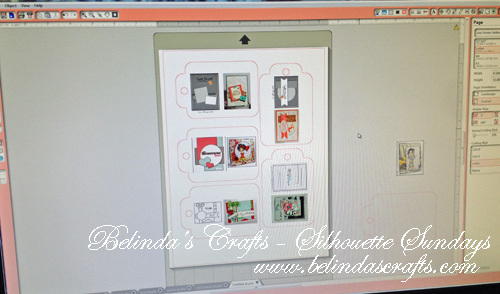
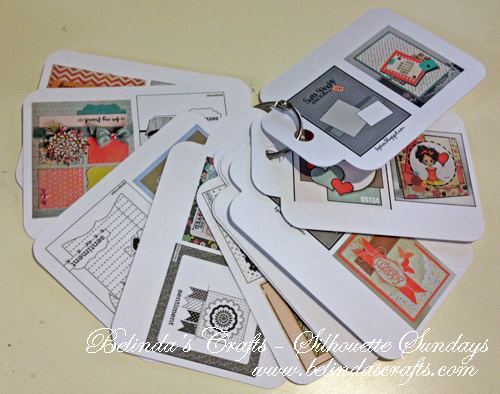
Well I am on my way on Thursday for a 4-day craft escape. So one thing I like to use at crops are sketches for inspiration.  So I decided to use my Silhouette to create tags that I could put my card sketches on and then I could easily flip through them to find some inspiration.

sketchtags2

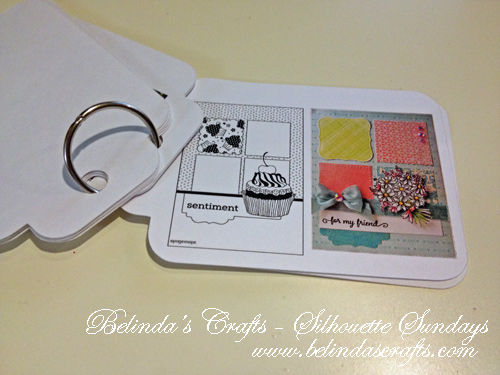
I used to print them out on large sheets of paper but this system works so much better. I get happy just flipping through them. I might even organize them by 6×6 card sketches or some other categories. The beauty is that it is on a ring so I can rearrange and add very easily.

sketchtags3I printed them right on my printer and then cut them on my silhouette. I printed them on white cardstock so they would be durable.

sketchtags4

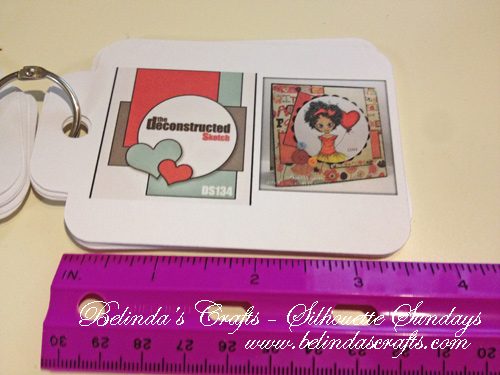
I settled for a little under 4 inches.

I am so thrilled when I think of other ways to use my machine.

Feel free to leave a comment and let me know what other things you have been using your machine for?

Have a blessed day!

Belinda

Follow

Get every new post delivered to your Inbox

Join other followers: